UX audit
Live
see what gets in the way on any page.
A browser extension that checks the page you're on against the standards you pick. WCAG 2.2, Apple's guidelines, NN/g, design systems, style guides, Core Web Vitals and privacy rules are all in. It marks each problem and says how to fix it.
For Chrome, Edge, Brave and Arc on a computer. Phones and tablets aren't supported yet. Nothing leaves your browser.
Why teams use it
Shows its sources
Every finding links to the guidance behind it.
Points at the problem
Numbered markers on a screenshot, plus a jump back to the live page.
You pick the standards
Check against all of them, or only the ones your team follows.
What it covers
Six lenses, one report.
45 built-in checks plus 70 WCAG rules from axe-core. Each one is a fixed rule run against the live page, so a rerun after a fix is a fair test.
WCAG 2.2 AA · Apple HIG · axe-core
Accessibility
- Images without alt text
- Links and buttons with no accessible name
- Form fields without labels
- Personal detail fields without autocomplete
- Text contrast below 4.5:1, or 3:1 for large text
- Links in body text marked by color alone
- Text smaller than 11px, Apple's minimum
- Missing, repeated or skipped headings
- Missing page language or title
- Pinch-zoom turned off
- Tap targets under 24×24px
- Custom tab order, duplicate IDs and untitled frames
- Audio that plays on its own
- 70 axe-core rules, like ARIA mistakes, list structure, table headers and skip links
NN/g · Laws of UX · Shneiderman · ISO 9241-110
UX design
- Placeholder text used as the only label
- Controls under Apple's 44×44pt touch size
- Email and phone fields with the wrong keyboard
- Required fields that aren't marked
- Links that open a new tab without saying so
- No route to help or contact
- Too many filled buttons on the first screen
- Main navigation with more than five top-level items
- Too many typefaces
Style guides · NN/g
Content design
- “Click here” and “Learn more” links
- Generic button labels like Submit or OK
- Body copy above NN/g's grade 8 reading level
- Sentences over 25 words
- Paragraphs over 5 sentences
- Long phrases in all caps
- Mixed Title Case and sentence case
- Too many exclamation marks
web.dev Core Web Vitals
Performance
- Main content slower than 2.5 seconds to appear (LCP)
- Layout that shifts while loading, above 0.1 (CLS)
- Images without width and height
Google Search Central
Search
- Missing meta description
- Vague page titles like “Home”
- Pages that ask search engines not to list them
GDPR · FTC · UK ICO · Deceptive Design
Privacy and trust
- Marketing consent boxes ticked already
- Decline options that guilt people into saying yes
- Tracking services that load with the page
The report
Every finding says where, why and how to fix it.
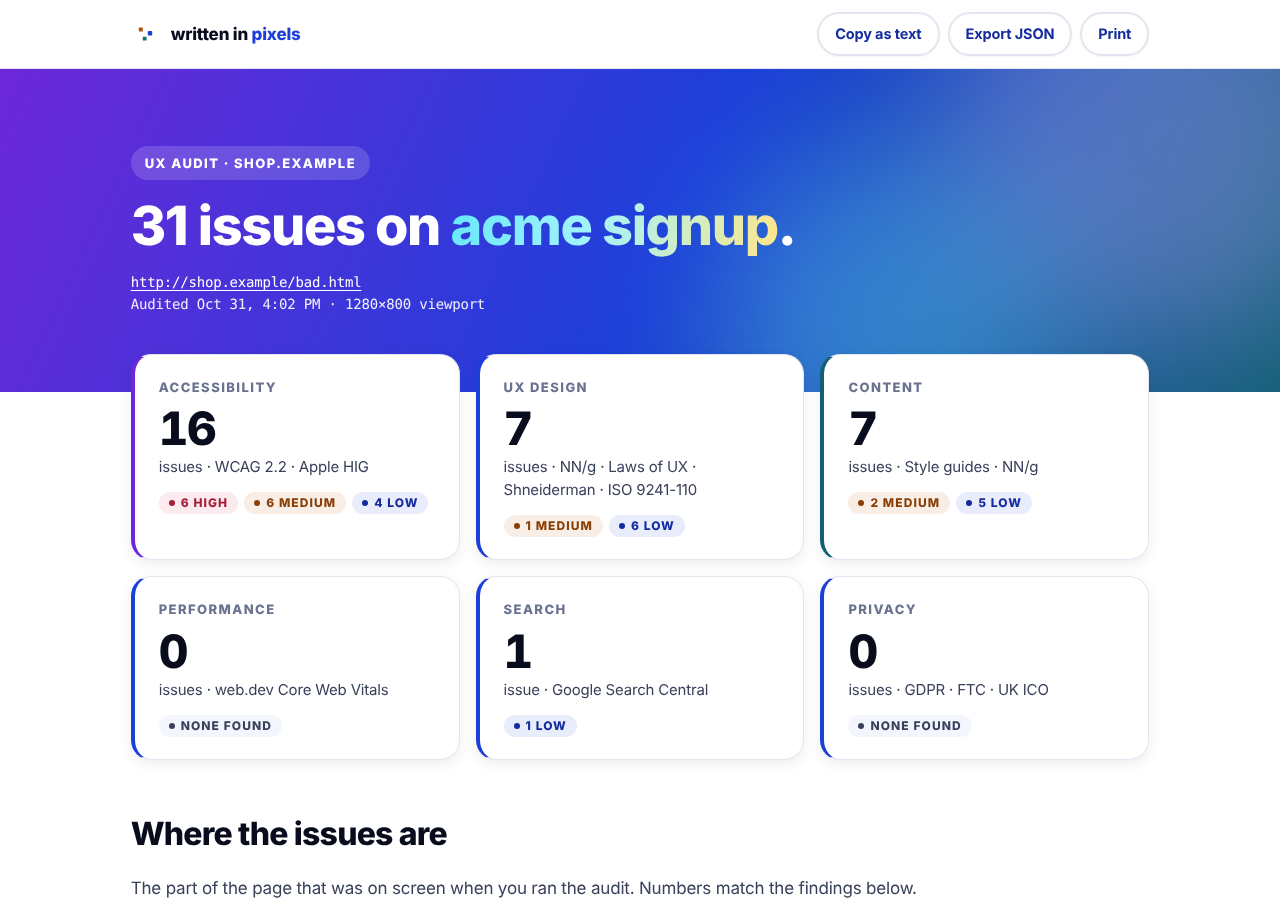
Marked on screen
Numbered boxes show where each issue sits on the part of the page you were looking at.
Show on page
Jump back to the live page with the problem outlined.
Pick your standards
Choose them before you run it, or turn them on and off in the report to see what each one adds.
Sources included
Every finding links to its sources. Copy the report for a ticket, export it as JSON or print it.
Standards
Built on guidance design teams already use.
These are the pages the checks come from. Pick any mix of these groups in the extension. In the report, every finding links to the sources that apply and says what each recommends.
WCAG 2.2
With Section 508 and EN 301 549 where axe-core maps them
- 1.1.1 Non-text Content (A)
- 1.3.1 Info and Relationships (A)
- 1.3.5 Identify Input Purpose (AA)
- 1.4.1 Use of Color (A)
- 1.4.2 Audio Control (A)
- 1.4.3 Contrast (Minimum) (AA)
- 1.4.4 Resize Text (AA)
- 2.4.2 Page Titled (A)
- 2.4.3 Focus Order (A)
- 2.4.4 Link Purpose (In Context) (A)
- 2.4.6 Headings and Labels (AA)
- 2.5.8 Target Size (Minimum) (AA)
- 3.1.1 Language of Page (A)
- 3.1.5 Reading Level (AAA)
- 3.3.2 Labels or Instructions (A)
- 4.1.2 Name, Role, Value (A)
- Section 508, Applicability and conformance requirements
- EN 301 549, International harmonization (Section508.gov)
- Deque axe-core, axe-core accessibility engine
Design systems
GOV.UK, U.S. Web Design System, IBM Carbon and Android
Privacy and dark patterns
FTC, GDPR, UK ICO and Deceptive Design
Apple Human Interface Guidelines
UX design standards
NN/g’s 10 heuristics, Laws of UX, Shneiderman’s Eight Golden Rules and ISO 9241-110
Written in Pixels standards
- A-05 Text contrast
- A-09 Never color alone
- C-04 Type floor
- C-08 Heading levels
- D-10 Reflow and zoom
- D-13 Top-level navigation
- F-01 Target size
- F-04 Keyboard
- F-06 Semantics
- F-08 Names and alt text
- F-10 Consistent help
- F-12 Media
- G-01 Plain language
- G-03 Sentence case and verbs
- G-07 Paragraphs
- G-09 Link text
- G-14 User control
- H-06 Banned words and marks
- I-02 Visible labels
- I-03 Required and optional
- I-06 Input types
- J-01 Core Web Vitals
- J-04 Image sizing
- K-04 Consent
- K-05 Nothing before consent
- L-07 One primary per view
Nielsen Norman Group articles
- Placeholders in Form Fields Are Harmful
- “Learn More” Links: You Can Do Better
- Writing Hyperlinks: Salient, Descriptive, Start with Keyword
- Marking Required Fields in Forms
- Opening Links in New Browser Windows and Tabs
- Touch Targets on Touchscreens
- F-Shaped Pattern of Reading on the Web: Misunderstood, But Still Relevant (Even on Mobile)
- Plain Language Is for Everyone, Even Experts
- Legibility, Readability, and Comprehension: Making Users Read Your Words
- A Checklist for Designing Mobile Input Fields
Content style guides
GOV.UK, Microsoft, Google, Mailchimp and Digital.gov
- GOV.UK, A to Z style guide
- GOV.UK, Use clear language
- GOV.UK, Write effective links
- Microsoft Writing Style Guide, Capitalization
- Microsoft Writing Style Guide, URLs and web addresses
- Microsoft Writing Style Guide, Exclamation points
- Google developer style guide, Cross-references and linking
- Google developer style guide, Capitalization
- Google developer style guide, Periods and other end punctuation
- Mailchimp Content Style Guide, Grammar and mechanics
- Digital.gov, Clear and short
- Digital.gov, Headings
Performance and search
web.dev Core Web Vitals and Google Search Central
We checked every source against the live page on 30 and 31 Oct 2026. Written in Pixels standards are the studio's own rules. UX Audit includes axe-core by Deque Systems, used under the Mozilla Public License 2.0. UX Audit isn't affiliated with Apple, Nielsen Norman Group, W3C, Deque or the other publishers.
Install
Up and running in four steps.
Download
Get the zip file and unzip it.
Open extensions
Go to chrome://extensions in Chrome, Edge, Brave or Arc.
Developer mode
Turn on the switch in the top right corner.
Load it
Choose Load unpacked, pick the unzipped folder and pin it to your toolbar.
UX Audit for Chromium browsers
- Runs on
- Chrome, Edge, Brave or Arc on a computer
- Version
- 1.4.1
- Reads
- Only the tab you click it on, when you click it
- Stores
- Your last five reports, on your computer
- Sends
- Nothing
Limits
A fast first pass, not a replacement for people.
Rules catch the problems a rule can see. The rest needs someone who knows the users and the task.
Good at
- Catching missing labels, names, alt text and low contrast before they go live
- Spotting vague links, generic buttons and dense copy
- Flagging ARIA mistakes and consent tricks
- Giving a team a shared checklist it can rerun
Can't tell you
- Whether alt text and labels are accurate
- How the page feels with a keyboard or screen reader
- Contrast on text over images or gradients
- Whether people can finish their task
- Anything behind a click, like error states and menus
- Real-world speed. Speed comes from one load on your computer, so check field data too
Privacy
The extension reads only the tab you audit, and only when you click it. Reports stay on your computer, and we keep the last five. It sends nothing to us or anyone else. This site has no cookies and no tracking. Read the full privacy policy.
Accessibility
We built this site to WCAG 2.2 AA and tested it with automated checks, keyboard only and at 320px wide. A full screen reader pass is still to come. If something gets in your way, book a call and tell us. We'll fix it.
The tool finds what a rule can see. We find the rest.
If you want a person to walk your product with real user goals, tell us what's stuck.